Parent/Child Rooms allow you to sell your property in different ways — either as individual rooms or as a full unit (such as an entire apartment, villa, or guesthouse). This setup helps you maximise revenue, offer flexible booking options, and avoid overbooking.
What Are Parent/Child Rooms?
A Parent Room represents the full unit (for example, an entire villa).
Child Rooms represent the individual rooms inside that unit that can also be sold separately.
Examples:
A villa with 3 bedrooms
A guesthouse where the whole house can be booked, or each room can be rented individually
A suite that contains multiple smaller rooms
Why Use Parent/Child Rooms?
1. Flexible sales options
Offer guests the choice of:
Booking the full unit (Parent Room), or
Booking individual rooms (Child Rooms)
2. Automatic availability control (prevents overbooking)
Parent/Child logic ensures availability stays accurate:
This keeps your calendar correct and prevents double-bookings.
3. Improved revenue opportunities
You can:
Sell the entire unit at a premium
Sell rooms individually when there is demand
Adjust pricing per room or per unit
How Parent/Child Rooms Affect Billing
Each Parent and Child room counts as a separate unit in your subscription.
For example:
A villa (Parent Room) + 2 bedrooms (Child Rooms) = 3 billable units
This is because each unit can have its own availability, pricing, and booking behaviour in the PMS.
How to Set Up Parent/Child Rooms
Parent/Child configurations must be set up by the RoomRaccoon team.
To request setup
Contact Support
Provide:
The name of the full unit (Parent Room)
The names of each room inside it (Child Rooms)
Our team will configure the Parent/Child link for you.
How Parent/Child Rooms Appear in Your Calendar
Once configured:
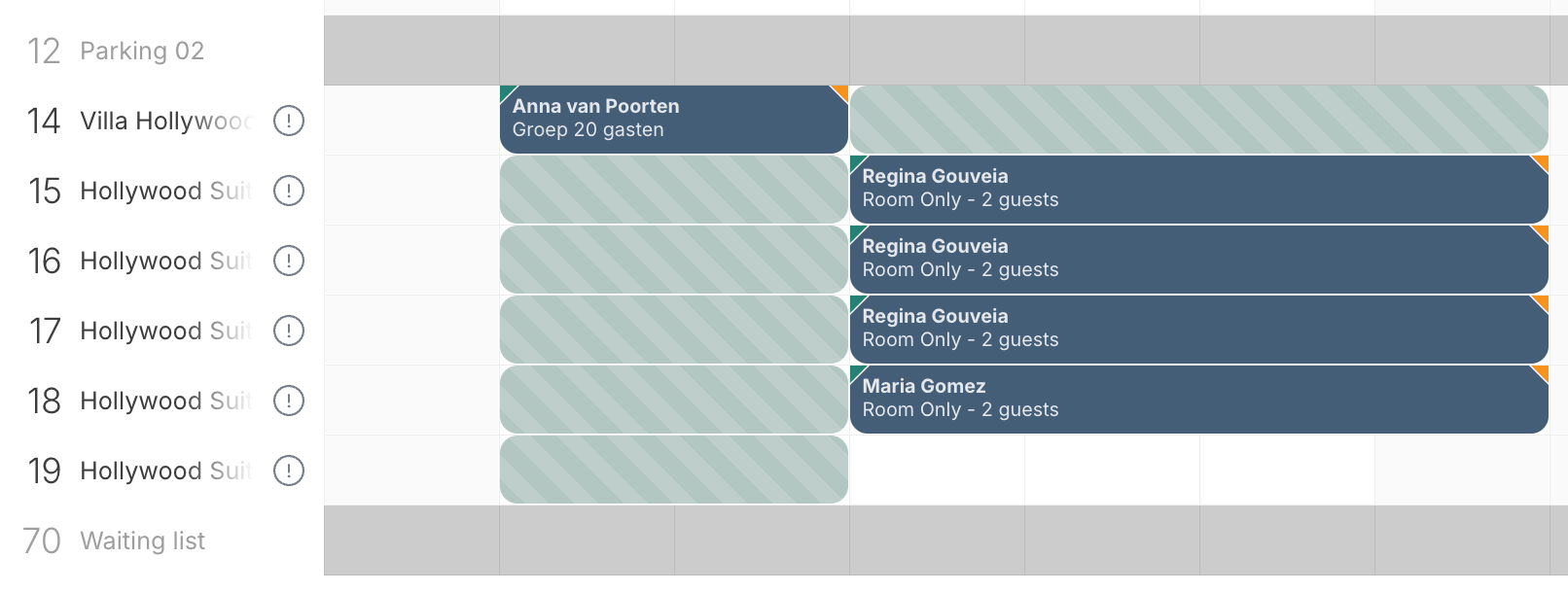
If the Parent Room is booked, the Child Rooms will show as blocked.
If a Child Room is booked, the Parent Room will show as blocked, while other Child Rooms remain available.
This ensures guests only see valid availability through your Booking Engine and OTAs.
Tips for Managing Parent/Child Rooms
Make sure room names clearly show which units belong together.
Test your setup once completed — book a Parent and Child room to confirm availability updates correctly.
Review your pricing strategy: Parent Rooms often have higher rates due to exclusivity.
If you need help creating or updating Parent/Child Rooms, our Support Team is ready to assist.
Was this article helpful?
That’s Great!
Thank you for your feedback
Sorry! We couldn't be helpful
Thank you for your feedback
Feedback sent
We appreciate your effort and will try to fix the article