The Daily Dash gives you a real-time overview of your property’s day. It brings together key operational, revenue, and risk insights in one place, so you can quickly see what needs attention and where opportunities lie.
The dashboard focuses only on active bookings. Cancelled, blocked, and allotted reservations are excluded from all counts and charts.
The Daily Dash in a glance:
A live overview of operations
Clear visibility into arrivals, departures, and housekeeping
Insights into revenue, demand, and booking behaviour
Early warnings for payments, maintenance, and missed opportunities
It’s designed to help you prioritise your day and make informed decisions quickly.
Dashboard Overview

Greeting and Weather: At the top of the dashboard, you’ll see:
A personalised greeting using your first name
Today’s local weather, based on your property location
Arrivals (Rooms): Shows how many rooms are arriving today.
Counts rooms, not reservations
Group bookings count each room separately
Departures (Rooms): Shows how many rooms are checking out today.
Uses the same logic as arrivals, based on departure date
Stayovers (Rooms): Shows rooms that:
Arrived before today
Are staying at least one more night
These are rooms currently in-house.
In-House (Guests): Shows the total number of guests, including adults and children.
Only includes reservations with status Checked-in or Checked-in online
Occupancy: Shows today’s occupancy percentage.
Based on booked rooms vs available rooms
Only parent rooms are counted if your property uses parent/child room setups
ADR (Average Daily Rate): Shows the average rate for rooms sold today.
Includes the room rate and add-ons included in the rate
Excludes separately sold add-ons
Left side of Dashboard
Today’s Arrivals Due
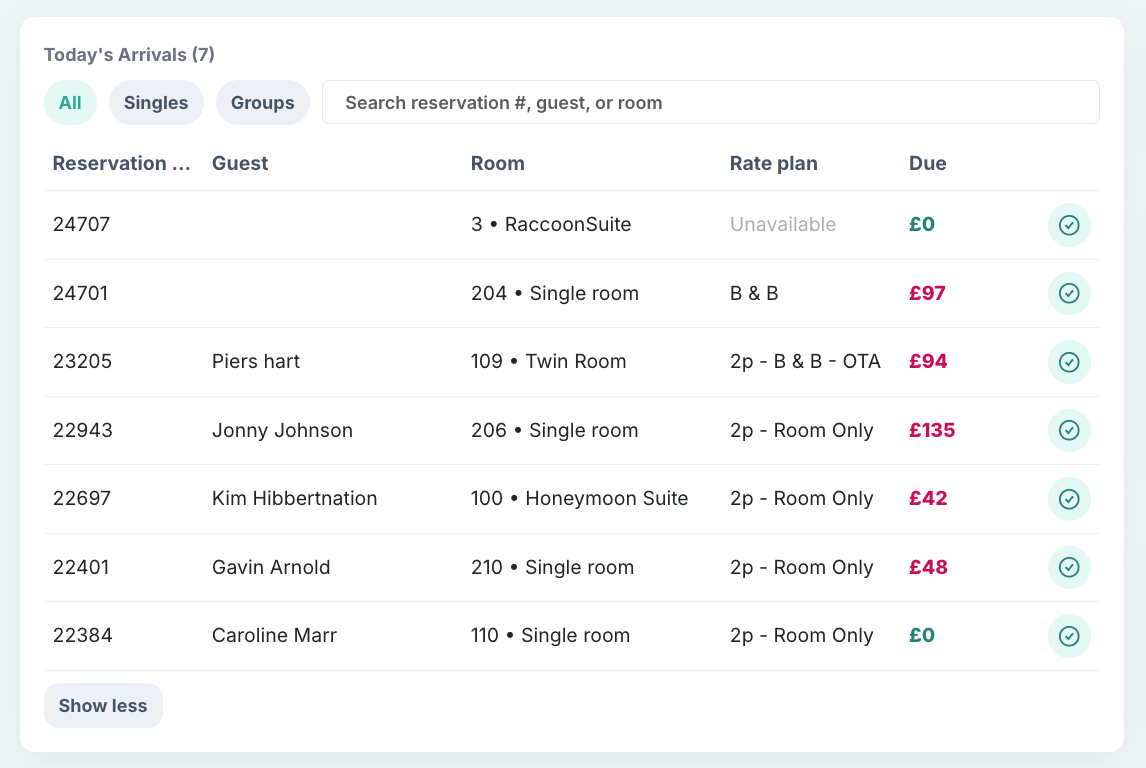
This section helps front-desk teams prepare for arrivals. Rooms arriving today that are not yet checked in appear here. Some useful features:
Group and linked reservations are highlighted together
Due amounts are colour-coded:
Green: nothing due
Red: payment still due
Quick check-in button for fast check-ins
Search by guest name, reservation number, or room
Open the full reservation directly from the dashboard
Today’s Departures Due
This section shows rooms that need to be checked out today.
If nothing is due, a quick check-out button is shown
If payment is still due, you’ll be prompted to open the reservation to collect payment
Sorting and search work the same way as arrivals
14-Day Occupancy and Rate Forecast
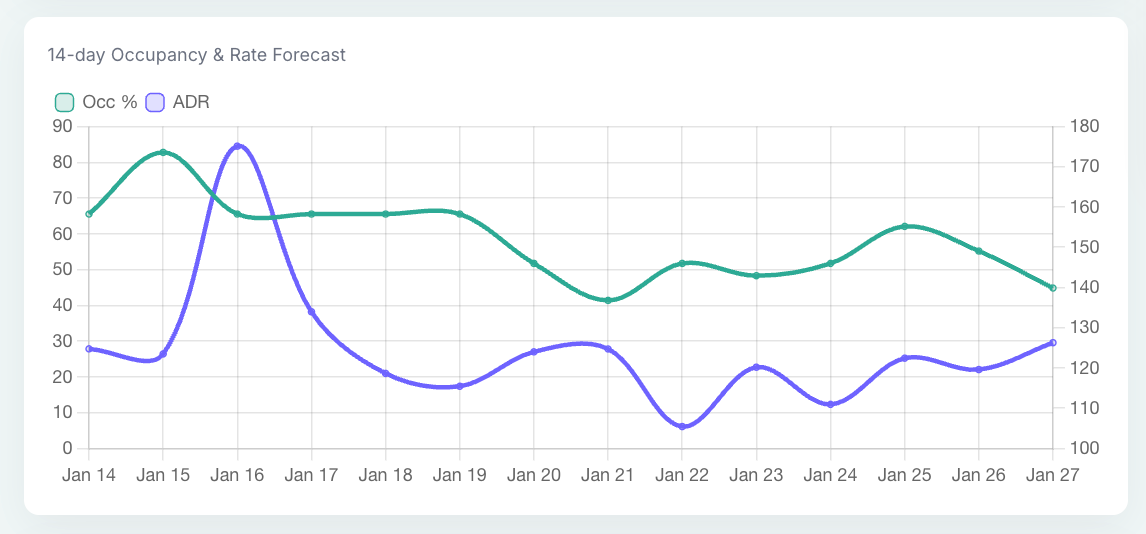
This chart shows what the next two weeks look like:
Occupancy percentage
ADR
Hover over any day to see exact values. This is useful for spotting quieter days, busy periods, and pricing opportunities.
Booking Pickup (Last 7 Days)
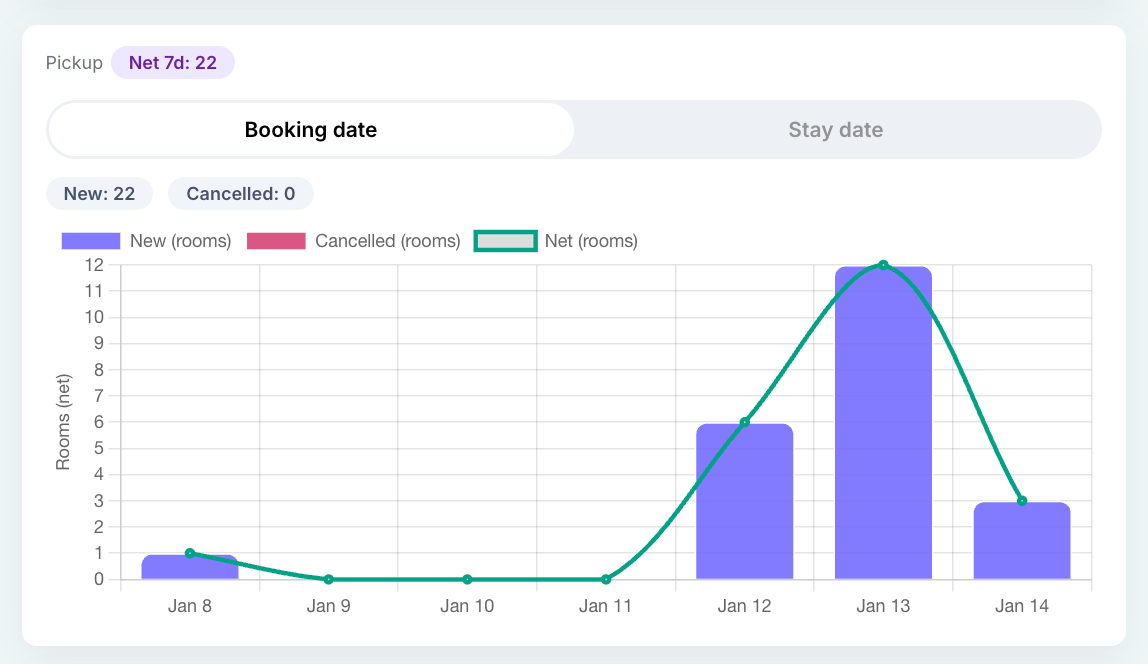
Pickup shows how your business is moving.
Pickup = new bookings minus cancellations
View pickup by:
Booking date
Stay date
Purple bars show new bookings
Pink bars show cancellations
This helps you see whether you’re gaining or losing momentum.
Pickup by Stay Date
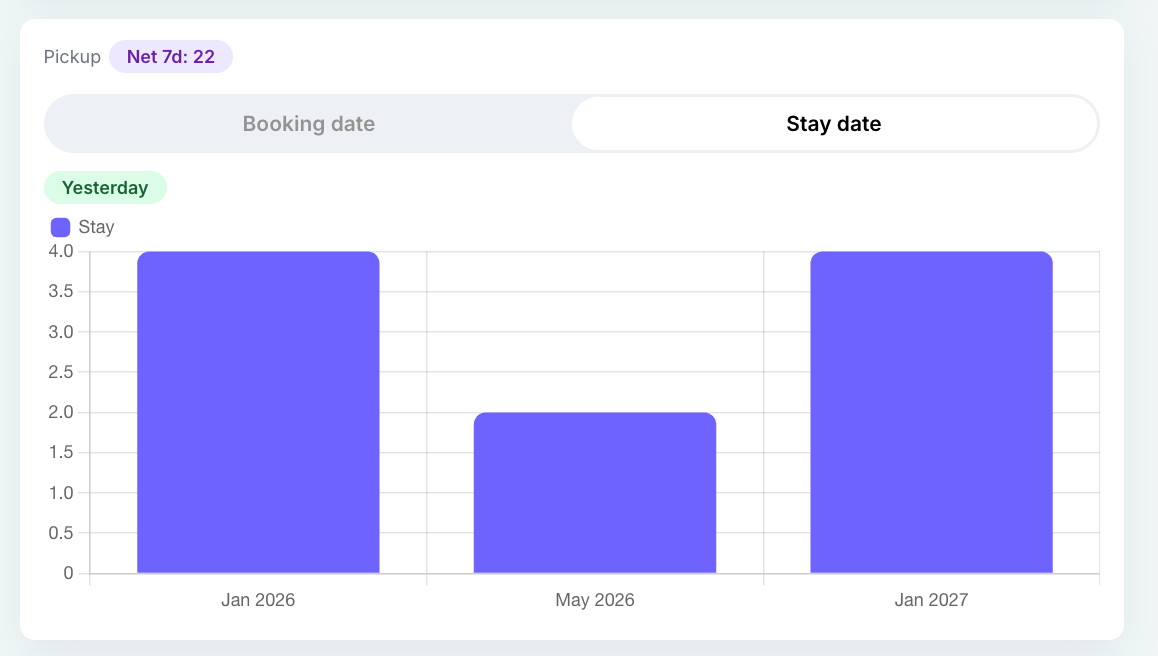
This view shows which future months are currently receiving bookings. It helps you understand longer-term demand trends and booking pace.
Google Hotel Ads Performance
This is for users with Google Hotel Ads enabled in their account. The dashboard will show realtime GHA performance data.
Please note, if it’s not enabled, demo data is shown (clearly marked).
Channels and Guest Segments
Channels: Shows performance by booking channel. Useful for understanding your distribution mix.
Segments (Purpose of Stay): Shows bookings by purpose of stay, such as leisure or business. Helps identify which guest types are driving demand.
Right side of Dashboard
Today at a Glance
This section combines:
Today’s weather
Event-driven demand insights (available with RaccoonRev Plus)
If an event is likely to drive higher demand, you’ll see a note such as: “Expect higher walk-ins”.
Alerts and Tasks
This section highlights items that may need attention today.
You may see:
Rooms ready to inspect
Deposits to follow up (if enabled)
Rooms in maintenance
New upsells waiting for action
Unavailable features are shown as greyed-out, with a tooltip explaining what’s required.
Payments and Risks
Available if RaccoonPay is enabled.
You’ll see:
Outstanding payout balance
Amounts still to be collected today
Chargebacks from the last 30 days that need action
This helps you stay on top of cash flow and payment risks.
Upsell Performance
If RaccoonUpsell is enabled:
Shows revenue from upsold add-ons and room upgrades
If no upsells are recorded:
You’ll see a prompt to request tips and support
Booking Day and Time Insights
This section shows:
The day of the week guests most often book
The time window when bookings are most likely to happen
This data is based on booking behaviour, not arrival dates, and is useful for marketing and campaign timing.
Was this article helpful?
That’s Great!
Thank you for your feedback
Sorry! We couldn't be helpful
Thank you for your feedback
Feedback sent
We appreciate your effort and will try to fix the article