The Reservations Dashboard gives you an entire overview of the check-ins, check-outs, new reservations, and new cancellations on a specific day. This guide will detail how to navigate and make the most of the dashboard's features.
We recommend that you keep this page open at your hotel so that you can easily access the reservations of guests checking in and guests checking out. From the Dashboard, you can click on the reservation to easily see all information and execute any actions required for check-in or check-out.
Booking Engine Performance
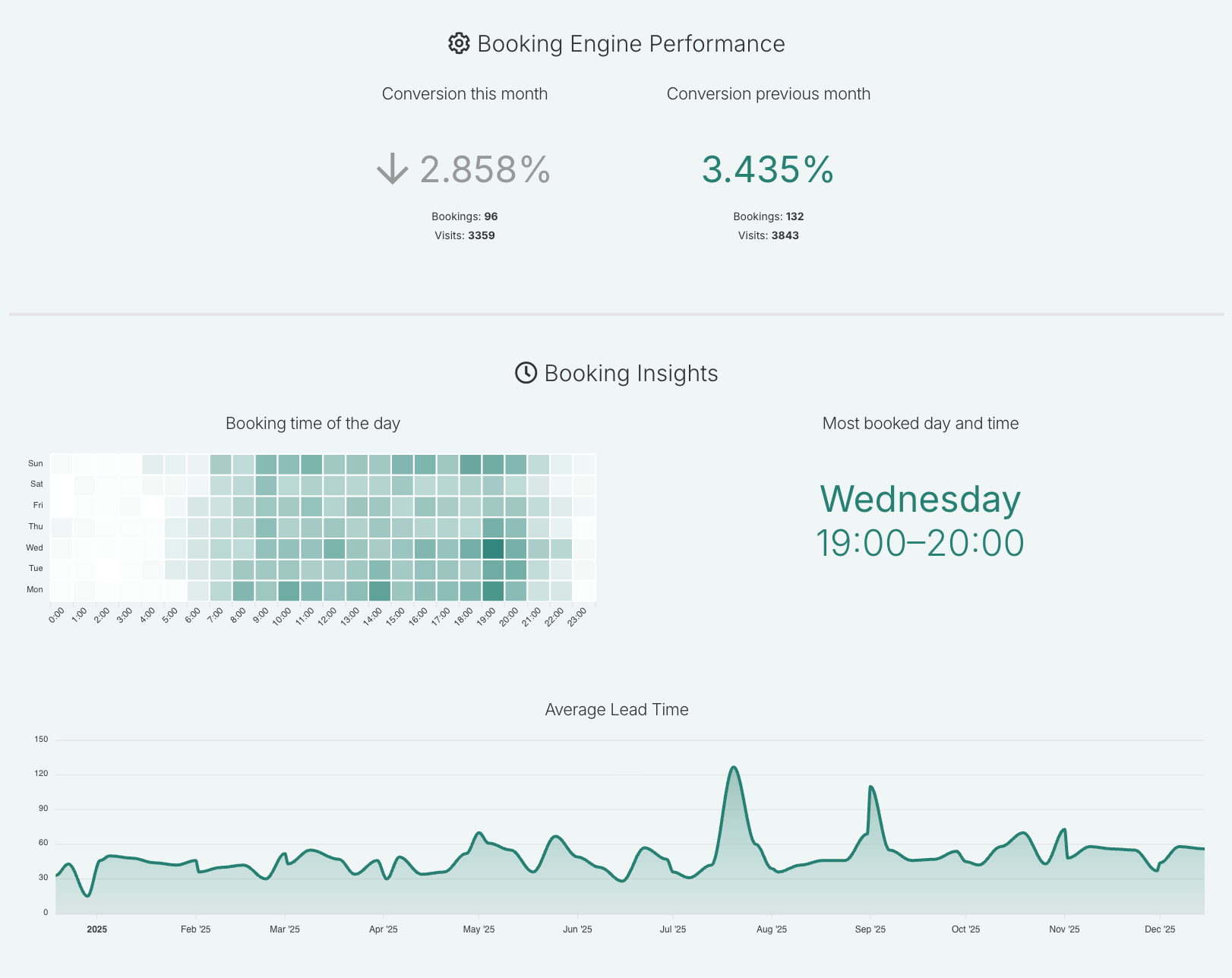
Customers using RaccoonRev also have access to Booking Insights and Booking Engine Performance. This feature shows you when guests are most likely to book — both by day of the week and by time of day. The dashboard also provides the following insights about your booking engine performance:
Your conversion: How many people booked via your bookings engine vs. how many people visited your Booking Engine in a month.
Previous conversion: Allows you to easily compare current performance to the past month.
Booking engine insights: Information about your most booked time and day.
Average lead time: shows, on average, how many days pass between when guests make a booking and the day they check in.
These insights help you:
Understand guest booking behaviour
Spot high-demand moments
Adjust your dynamic pricing strategy based on real booking patterns
Booking Insights gives you the data you need to make smarter, more timely pricing decisions to increase your direct bookings.
Useful Tips
Keep the dashboard open for easy access to daily operations.
Regularly check the booking engine performance to stay updated on your hotel's performance metrics.
The Reservation Dashboard displays reservations in:
New bookings/cancellations are sorted by reservation number.
The departures and arrivals are sorted by name.
Was this article helpful?
That’s Great!
Thank you for your feedback
Sorry! We couldn't be helpful
Thank you for your feedback
Feedback sent
We appreciate your effort and will try to fix the article